 EffectCraft
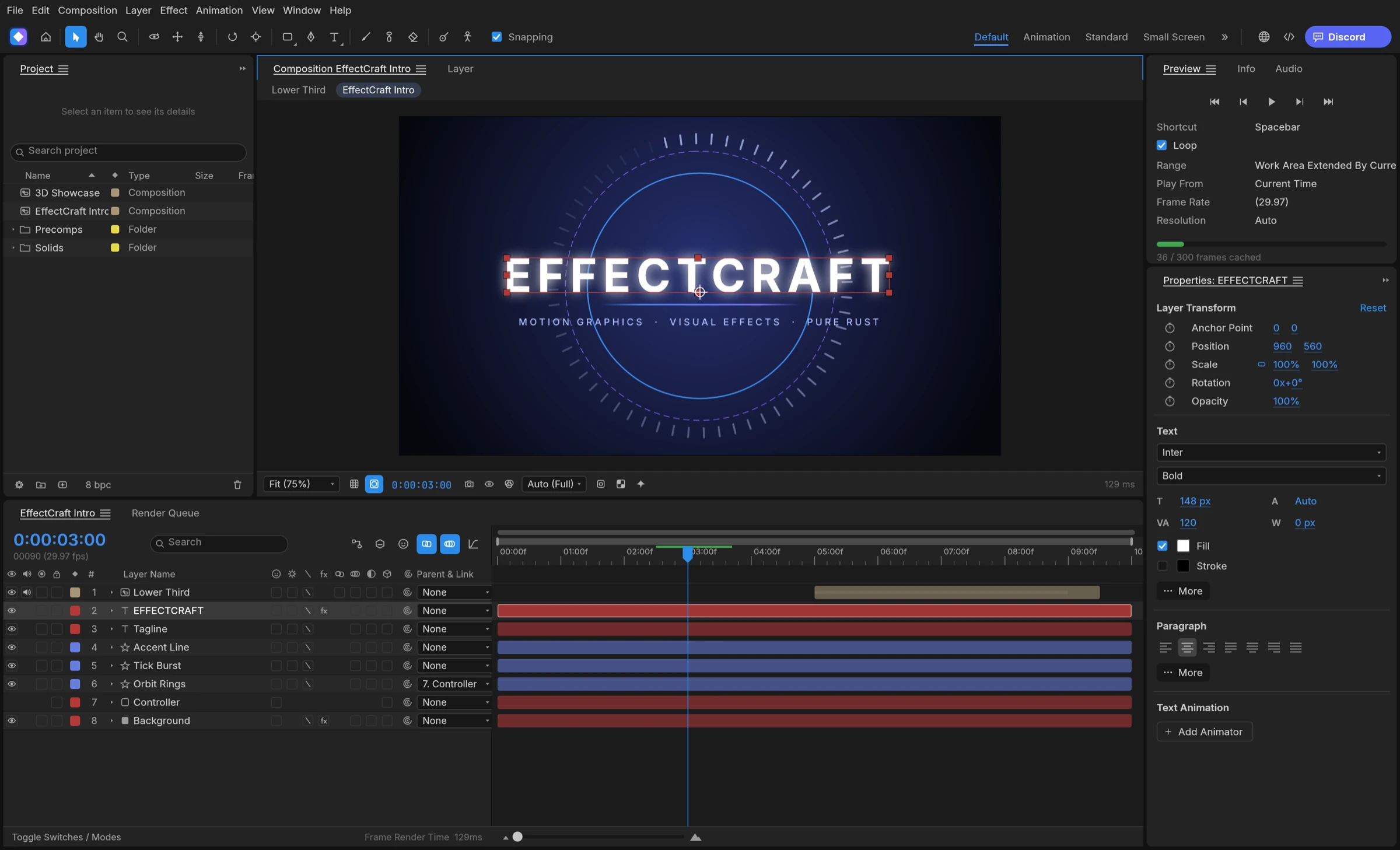

The best free After Effects alternative depends on how you like to work. If you think in layers, keyframes and a timeline, start with EffectCraft: it is free, open source under MIT or Apache-2.0, and its panels, menus and shortcuts follow the motion design conventions After Effects users already know. If you prefer node graphs, Natron and the Fusion page in DaVinci Resolve are the free compositors to compare.
Layer-based or node-based: choose a free After Effects alternative by workflow
Every free After Effects alternative, and every paid After Effects replacement, falls into one of two families. A layer-based app stacks solids, shapes, text, footage and nested compositions on a timeline and animates their properties with keyframes. That is how EffectCraft works, and it is the model After Effects users already know. A node-based app connects image-processing tools in a graph: Blackmagic describes Fusion as a node based interface, and Natron’s own site invites Nuke and Fusion users to work with nodes.
How to decide in three steps
- Open your last few projects and note whether you built them as layer stacks or as chains of effects.
- If they are layer stacks with text, shapes and keyframes, shortlist layer-based tools such as EffectCraft and Premation.
- If they are shot-based compositing with keying and tracking, shortlist node-based tools such as Natron and Fusion in DaVinci Resolve.
Motion designers who make titles, lower thirds, logo animations and social graphics usually feel at home in a layer timeline. Compositors who rebuild shots from many passes often prefer a node graph, because the order of operations stays visible.
In short: pick the family first, then compare apps inside it. For most people leaving After Effects, that means a layer-based free After Effects alternative.
What EffectCraft brings as a free After Effects alternative
EffectCraft is a free, open-source motion graphics and visual effects app written in Rust. Its README lists compositions, layers, keyframes, effects, layer styles, expressions, 3D cameras and lights, and a render queue, which makes it a free alternative to After Effects for the same everyday jobs.
- Familiar animation tools: linear, Bezier, hold and eased keyframes, a Graph Editor, parenting, track mattes and motion blur.
- Expressions in JavaScript with wiggle, loopOut and thisComp.layer, plus an inline editor and the pick-whip.
- Lottie import and export built in, so a web or app animation needs no extra plugin.
- A readable project file: projects are versioned JSON (.ecproj) that diff cleanly in version control.
- Everything is scriptable through a command line, a JSON control channel and an MCP server for AI agents.
- Private by default: no telemetry, and no network access unless you ask for it.
How to try it on a real job
- Download the build for your system from the project’s GitHub releases; the download guide explains which file to pick.
- Follow the beginner tutorial to make and render a short animated title.
- Rebuild one small piece of your own work and compare the export with what you need.
EffectCraft suits After Effects users who want the same layer-and-keyframe habits without a subscription, and developers who want project files and automation they can script.
A free After Effects alternative for Mac, Windows or Linux
Platform often decides the shortlist before features do. Here is how each free After Effects alternative in this guide covers the three desktop systems and the browser, using each project’s own pages.
- Mac: EffectCraft ships one universal app for Apple silicon and Intel Macs, signed and notarized according to the project README, and the maintainers name macOS as their most tested platform. Cavalry and Premation also publish macOS builds.
- Windows: EffectCraft publishes MSI installers and portable zips for x64 and ARM64 PCs; the README says the installers and executables are code-signed.
- Linux: EffectCraft publishes AppImage, Flatpak, deb, rpm and tarball packages. Natron, Friction, Glaxnimate, Premation and DaVinci Resolve also list Linux downloads.
- Browser: Pikimov runs in Chrome or Edge with nothing to install. EffectCraft’s web build is a static site you host yourself.
How to pick by platform
On a Mac or a Windows PC, any tool in the list below is available, so choose by workflow. On Linux, read our guide to the After Effects alternative for Linux for package choices and setup. On a locked-down computer where you cannot install software, a browser tool is the practical route.
Best free After Effects alternatives
EffectCraft is the best free After Effects alternative in 2026 for anyone who already thinks in After Effects layers, keyframes and expressions.
1. EffectCraft: best for After Effects users who want a familiar layer workflow for free
EffectCraft is the strongest match for After Effects habits: its panels, menus and shortcuts follow familiar motion design conventions, with JavaScript expressions and a render queue, plus built-in Lottie import and export and an MCP server for AI agents. It covers all 38 blend modes, track mattes, parenting and motion blur, and it is open source under MIT or Apache-2.0. Compared with Premation, it runs with no telemetry and no network access unless you ask for it, while Premation’s installers use a free sign-in.
2. Premation
Premation is a free, open-source motion editor under AGPL-3.0 for Windows, macOS and Linux. Its homepage says it opens .aep projects.
3. Natron
Natron is a free, open-source node-based compositor under GPLv2 for Linux, macOS and Windows. It renders from the command line for batch jobs.
4. Fusion in DaVinci Resolve
Fusion is a node-based compositor built into DaVinci Resolve. Blackmagic offers the free DaVinci Resolve for Mac, Windows and Linux.
5. Cavalry
Cavalry is 2D animation and motion graphics software, free for individuals on macOS and Windows. Its feature list includes Lottie export.
6. Friction
Friction is open-source 2D vector motion graphics software under GPL-3.0. It exports animated SVG for the web.
7. Glaxnimate
Glaxnimate is an open-source vector animation app from KDE. It exports Lottie, animated GIF, WebP and SVG.
8. Pikimov
Pikimov is a free motion design editor that runs in the browser with no sign-up. Editing happens locally on your computer.