 EffectCraft

LightCraft — the photo editor
ArtCraft's open-source photo library and RAW developer, written in Rust. This is what every section below is about.
LightCraft is an open-source photo library and non-destructive RAW developer for macOS, Windows, Linux and the browser. Every slider is computed through a scene-referred, wide-gamut, 32-bit float pipeline — and your originals are never rewritten.
Download LightCraft Compare with Lightroom
Independent guide, not the official site. The product page is getartcraft.com and the source is on GitHub.
Three different things share this name. This page only covers the first one.
ArtCraft's open-source photo library and RAW developer, written in Rust. This is what every section below is about.
A different product from a different company, at lightcraft.pro. It is a browser previs platform for film crews: script import, Gaussian-splat locations, USD props, physically modelled cameras and an iPhone camera rig. Nothing on this page applies to Spark, and Spark does not develop photographs.
Some "lightcraft lighting" searches are about fixtures and lighting technique. That is not software, and this page will not help with it.
The two software products share a name and nothing else: different company, different audience, different file types.
LightCraft is an open-source photo library and non-destructive RAW developer from ArtCraft, written from scratch in pure Rust. It is a desktop application first — macOS, Windows, Linux and FreeBSD — with a WebAssembly build that runs in a browser. It is a free Lightroom alternative in the literal sense: a catalogue plus a RAW converter, not a subscription service.
"Non-destructive" is the design constraint, not a feature bullet. Adjustments are stored beside your files, the originals are never rewritten, and every slider is computed in a scene-referred, wide-gamut, 32-bit float pipeline before it reaches your screen. There is no account, no cloud tier and no telemetry — nothing leaves your machine unless you export it.
| Developer | ArtCraft (Brandon Thomas + community) |
|---|---|
| Written in | Pure Rust, clean-room |
| Type | Photo library + non-destructive RAW developer |
| Platforms | macOS (universal) · Windows (x64, x86, ARM64) · Linux (x86_64, aarch64) · FreeBSD · Web (WebAssembly) · CLI |
| License | MIT OR Apache-2.0 |
| Source | github.com/storytold/lightcraft — 13.7k stars, 153 contributors |
| Status | Stage: alpha |
| Account required | None |
| Price | Free, no subscription |
You do not have to take a reviewer's word for it. ArtCraft maintains a public parity tracker that scores LightCraft against Adobe Lightroom Classic 15.5 and Lightroom 9.6, item by item, across 532 capabilities. These are the project's own numbers:
Six workflows already run end to end on macOS: import → cull → develop → save and reopen → batch looks → export. That is a full round trip, not a demo.
Read the last number seriously. At roughly half the way to a mainstream practitioner's expectations, LightCraft is not yet a drop-in replacement for someone who lives inside Lightroom's print, book and tethering workflow. It is a working developer with a real library, an import path and an honest tracker — which is a different and more useful claim.
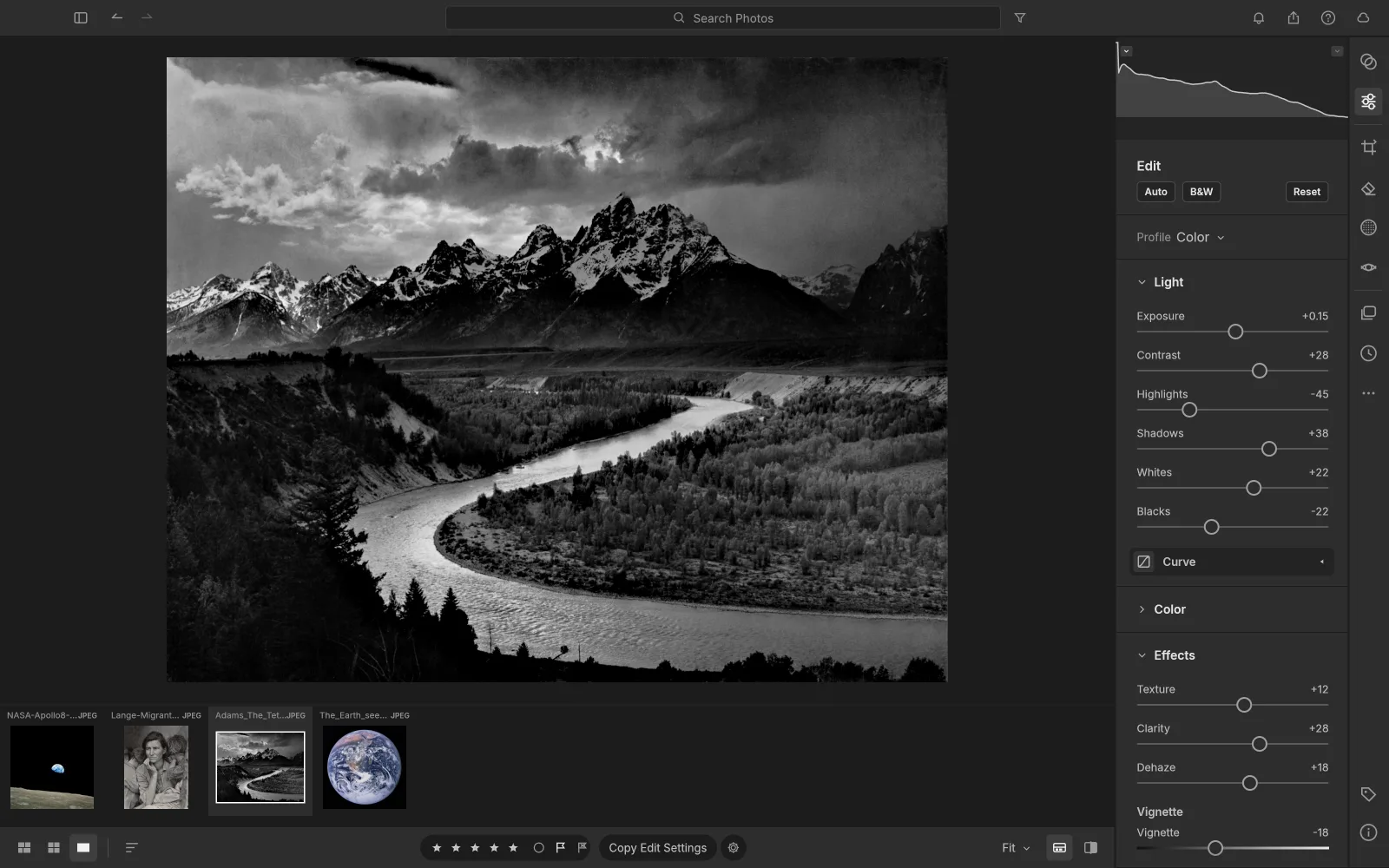
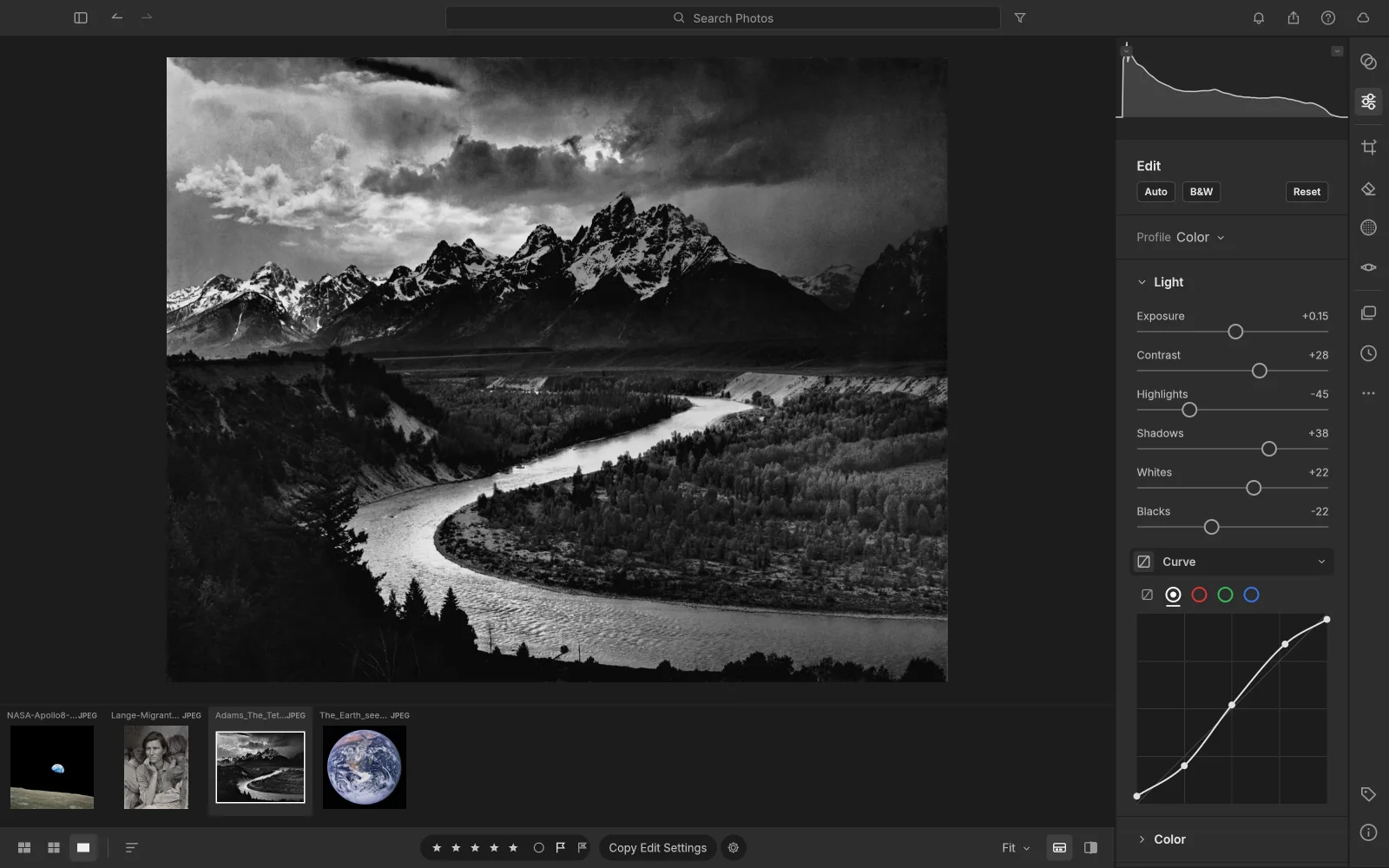
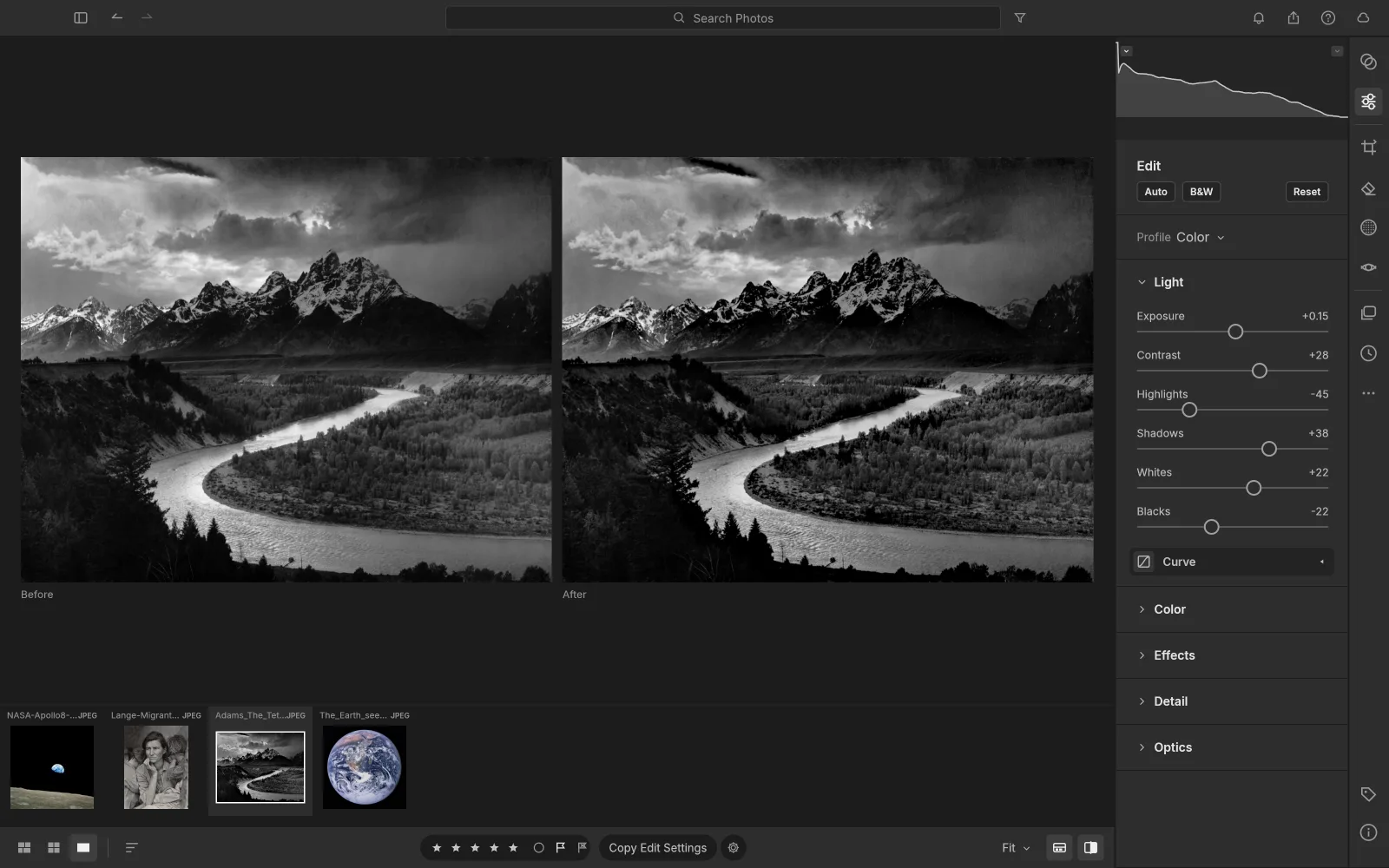
Exposure, Contrast, Highlights, Shadows, Whites and Blacks, plus edge-aware local tone mapping — a guided filter working on log-luminance. Pulling Highlights to −100 recovers a blown sky without the grey halo a naive curve leaves behind.
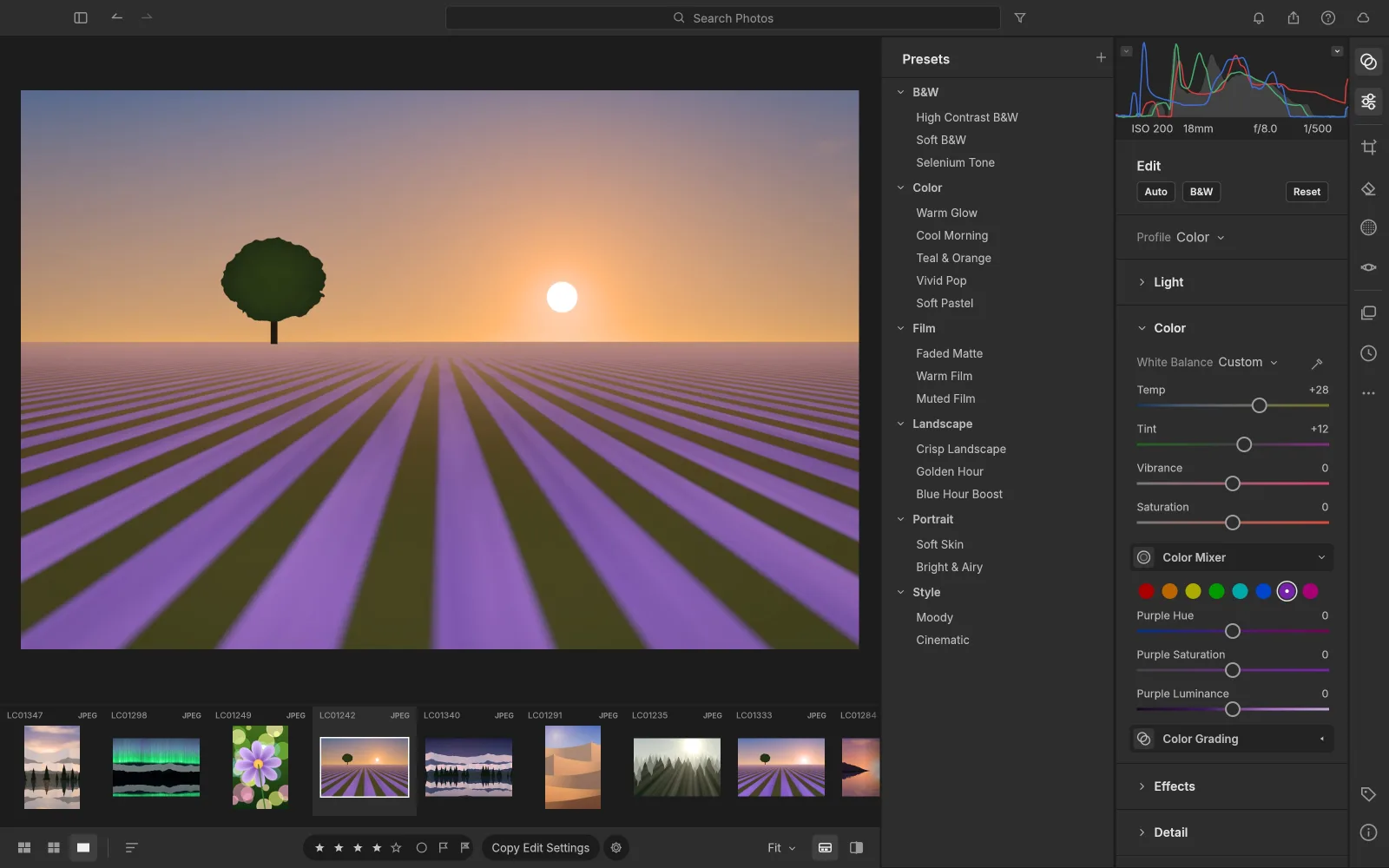
White balance by temperature and tint — Kelvin for RAW, relative for JPEG — with presets, an Auto option and a click-to-neutralise eyedropper. Vibrance that protects skin tones, Saturation, an 8-band Color Mixer (hue, saturation, luminance) and three-way Color Grading wheels with blending and balance. All of it is computed in OkLCh, so hue shifts stay perceptual rather than arithmetic.
Texture for fine detail, Clarity for mid-tone punch, Dehaze built on a dark-channel prior with guided refinement (push it negative to add atmosphere), a post-crop Vignette with highlight priority, roundness and feather, and resolution-independent film grain with size and roughness.
A parametric region curve with movable splits, plus point curves for RGB, Red, Green and Blue. The curves are monotone by construction, so a mid-edit drag can never produce an accidental tone inversion — a common failure mode in curve implementations that nobody documents until it bites you.
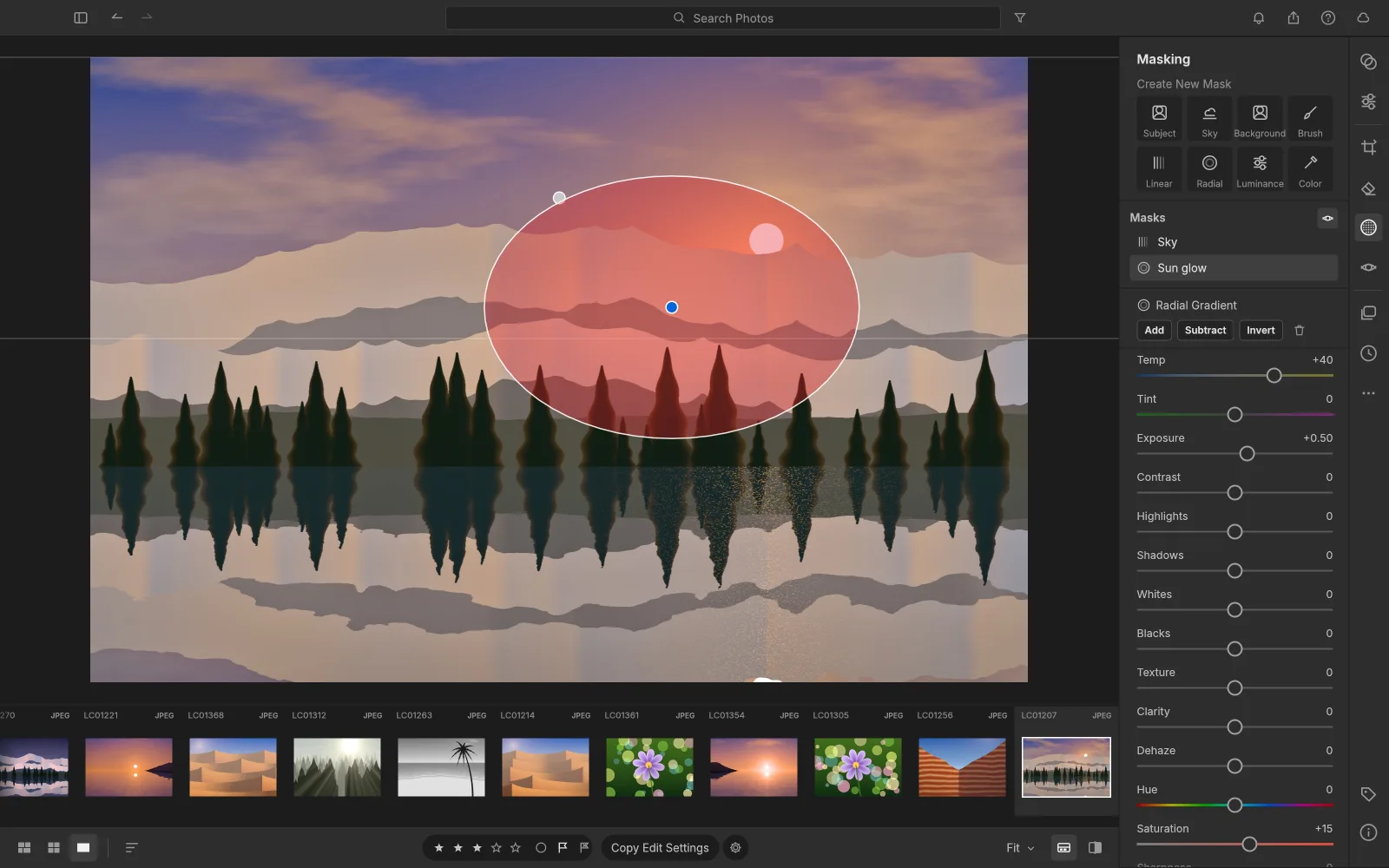
Paint with a brush (size, feather, flow, density, erase), drop linear and radial gradients with draggable pins, or select by Luminance Range, Color Range, Sky, Subject and Background. Combine components with Add, Subtract or Intersect, invert any of them, and use 17 local adjustments inside a single mask — temperature, tint, exposure, contrast, highlights, shadows, whites, blacks, texture, clarity, dehaze, hue, saturation, sharpness, noise, moiré and defringe — plus an overall Amount. For a separate layer-based editor, see PhotoCraft’s masking tools.
Forty-one hand-built presets ship in the box — Golden Hour, Teal & Orange, Faded Matte, Selenium Tone, Crisp Landscape and the rest — each with an Amount slider from 0 to 200 percent. Save your own from any group of settings, mark favourites, and copy, paste or sync edits across a whole selection, applying only the groups you choose.
Free or locked aspect ratios (1:1, 4:5, 5:7, 2:3, 4:3, 16:9, 16:10, original), drag-to-rotate straightening that always keeps the largest possible crop inside the frame, thirds, grid and golden-ratio overlays, flips and 90-degree rotations, and manual vertical, horizontal, rotate, aspect, scale and offset transforms.
One keystroke to monochrome, then an 8-band B&W Mix to darken skies or make foliage glow, and the Color Grading wheels for selenium, sepia or split-tone prints.
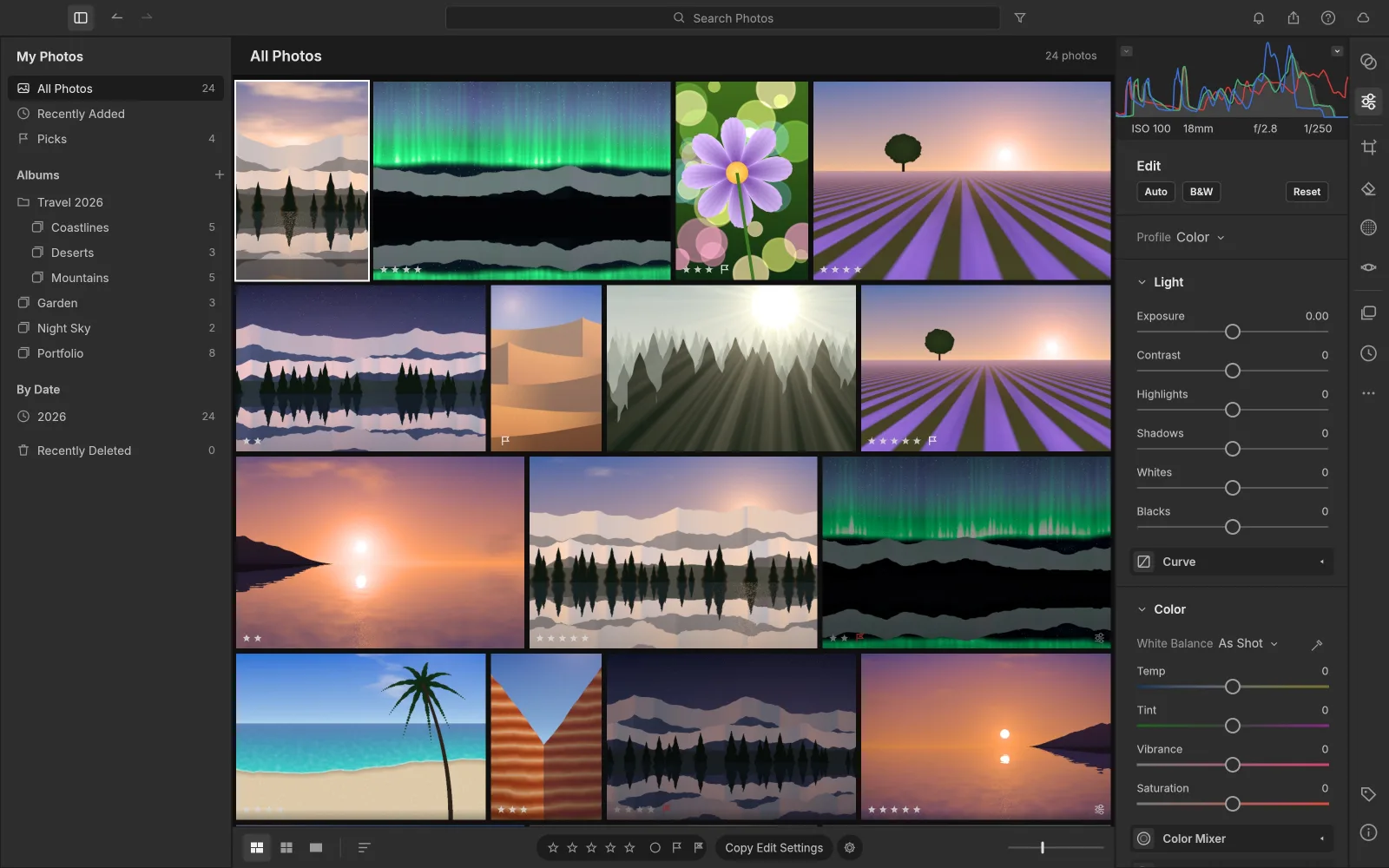
All Photos, Recently Added, Picks, By Date, Albums nested inside Folders, and Recently
Deleted. Rate 0–5, flag with P, X or U, colour-label with 6–9. Search understands fields,
not just words: rating:>3 flag:pick iso:>800 camera:x2 date:2026-04
keyword:mountains. The justified Photo Grid and Square Grid are virtualised, so
scrolling stays smooth at forty photos or forty thousand. The People view groups named faces,
including names read from XMP.
Select photos, then File → Contact Sheet PDF: A4 or Letter, landscape, rows and columns, and filename captions. You get a paginated PDF rendered at 150 dpi in sRGB, using your current edits. Limits are 1,000 photos, 100 pages and 256 MiB — this is a contact-sheet workflow, not a picture-package layout editor.
LightCraft ships with an MCP server and a control channel, so an agent can drive it end to end: import, apply edits, capture before/after screenshots and export. Every screenshot in the project's own README was captured that way. A CLI sits alongside the GUI for batch and headless work — the kind of automation that needs plug-ins or scripting in Lightroom.
Yes. Lightroom catalogue import landed on 8 October 2026 and is still being hardened — recent releases raised the catalogue and WAL size limit from 1 GiB to 4 GiB, added retries for XMP sidecar writes that failed, and fixed matching when a sidecar's extension differs in case. Your originals are not rewritten and no files are moved: the catalogue is read, and the edits live beside your photos as they always did.
This is the single feature that decides most migrations, so do not take our word for it. Point LightCraft at a copy of your catalogue first, check that your rated and flagged picks survived, open a few of your most-edited images and compare them side by side. If the results hold up on your own files, you have your answer — and if they do not, you have lost nothing but an hour.
Two things worth knowing before you start: XMP sidecars are read and written, so ratings, keywords and flags can round-trip with other tools; check the latest release notes before moving a working catalogue.
ArtCraft labels LightCraft "Stage: alpha — young and moving fast", and that label is accurate. These are the gaps that matter before you move a working catalogue across:
Judge it on what can be checked rather than on reassurance:
Current release: 0.9.1. Pick your platform on the project's GitHub Releases page; every build is published there and nowhere else.
Open GitHub Releases Official product page
There is no installer account, no licence key and no trial. If a download asks you to sign in or pay, you are on the wrong site.
Short version, from the project's own numbers: about 61% ready for real work overall, ~65% for an essentials user and ~51% for a mainstream practitioner, measured against Lightroom Classic 15.5. The round trip that matters already works — import, cull, develop, save and reopen, batch looks, export — and the parts that do not are concentrated rather than scattered.
| Area | LightCraft | What it means in practice |
|---|---|---|
| Global develop, presets, export, merge | Available | Day-to-day editing is usable now |
| Masking | Available | Local adjustments work; expect rough edges |
| Remove, heal, Enhance | Limited | Do heavy retouching elsewhere |
| Plug-ins | ~15% | Assume your plug-in has no equivalent |
| Classic output modules | 10% | No Book, Print, Map, Slideshow, publish, tethering |
| Hardware integration | ~40% | No display calibration, thin print profiles |
| Lens correction | no database | You correct distortion and vignette yourself |
| Video | 0% | Unavailable in the parity tracker |
Where the line sits. If your work ends in a screen export and you do not depend on plug-ins, LightCraft is already usable and the "free" part is real. If your work ends in a printed book, a tethered studio shoot or a delivery pipeline built on plug-ins, it is not a replacement yet — and no amount of marketing on this page would change that.
One comparison this page deliberately does not score: Darktable and RawTherapee. They are mature projects with different strengths, and scoring them here would only add another unverifiable table to the web. What can be said from LightCraft's own tracker is where it is weak — colour is estimated rather than measured, and there is no lens database — which is exactly where those projects have had years of head start. If colour fidelity on unusual bodies is your priority, test them side by side on your own files.
Free, with no catch mechanism. The source is MIT OR Apache-2.0, and there is no account, no cloud tier, no telemetry and no subscription. Nothing is held back behind a paid level because there is no paid level. What "free" does not mean is finished: the project's own tracker still lists video at 0% and the Classic output modules at 10%.
Depends which Lightroom user you are, and the project publishes its own answer. Against Lightroom Classic 15.5 it rates itself about 65% of the way to serving an essentials user, about 51% for a mainstream practitioner and about 61% overall for "ready for real work". Import, culling, developing, saving and reopening, batch looks and export all run end to end. If you live in Book, Map, Slideshow, Print, publish services or tethered capture, the answer today is no — that group sits at 10%.
Yes. Lightroom catalogue import landed on 8 October 2026 and is still being hardened; recent releases raised the catalogue and WAL size limit from 1 GiB to 4 GiB, added retries for failed XMP sidecar writes, and fixed matching when a sidecar's extension differs in case. Your originals are not rewritten and no files are moved. Because this is the feature that decides most migrations, test it on a copy of your catalogue before committing — see the migration section above.
From the parity tracker: the Classic output modules (Map, Book, Slideshow, Print, publish services, tethering) at 10% ready, video at 0%, plug-ins around 15%, hardware integration such as display calibration around 40%, and no lens profile database at all. The project lists gaps in retouching and masking as well, so test those workflows on your own files.
Of Adobe's 1,446 camera models, LightCraft decodes 83%, and 38% of those have been individually verified. Canon CR3 works on 26 verified bodies. Two named gaps to check before switching: compressed ORF and HE NEF currently open as previews rather than full sensor data. If you shoot compressed Olympus or high-efficiency Nikon, test your own files first.
Native builds for macOS (universal), Windows (x64, x86, ARM64), Linux (x86_64, aarch64) and FreeBSD, plus a WebAssembly build and a CLI. There is no iOS or Android app — if you want a mobile Lightroom alternative, this is not it.
No. The web target is a WebAssembly bundle you download and host yourself; there is no hosted page where you sign in and edit. Nothing in LightCraft involves an account or a server, which is the point — but it also means the browser build is a developer-facing convenience, not a cloud service.
Check three things. The source is fully public — around three thousand commits, 153 contributors, MIT or Apache-2.0. Builds are published on GitHub Releases and the product page is getartcraft.com; any other site offering an installer is not distributing the project's builds. And there is no account, no telemetry and no network requirement for editing. Two features — AI-assisted masks and face recognition — download models separately with their own terms, which is a deliberate split rather than a hidden dependency.
Different trade-offs rather than a winner, and this page does not score them. What the project's own tracker says is where LightCraft is weak: camera colour is estimated rather than measured, and there is no lens database, so lens-specific distortion and vignette correction does not exist yet. Those are areas where the older open-source tools have had years of head start. LightCraft's counter-arguments are a Lightroom-shaped interface, non-destructive edits stored beside your files, XMP sidecar exchange and Lightroom catalogue import.
Yes, and this is unusual enough to be worth knowing about. LightCraft ships with an MCP server and a control channel, so an agent can drive it end to end: import, apply edits, capture before/after screenshots and export. Every screenshot in the project's own README was captured that way. A CLI sits alongside the GUI for batch and headless work that would need plug-ins or scripting in Lightroom.
LightCraft is one of the apps from ArtCraft. The others cover video, design, audio and 3D.


